2025AI Engineer & Full-Stack Developer
Stacja 2.0 ERP/WMS system
A program that manages the warehouse, sales, packing, shipping, deliveries and documents. I built the MVP in 2 weeks, then came AI agents for pricing and part matching, plus multi-channel sales sync.
- 60%+
- shorter order fulfilment
- 10x
- sales channel revenue growth
- 5x
- faster product cataloguing
- Nuxt
- PostgreSQL
- Python
- FastAPI
- Electron
- Web scraping
- AI Agents
- SellRocket
- Baselinker
Overview
When I joined the company, it was running an outdated, off-the-shelf program for managing vehicle dismantling. It worked for about a year, with its bugs, but you could get the job done on it. It was slow, though, looked archaic, and packages had to be added with a separate tool.
Before Stacja existed, I wrote a few standalone programs meant simply to work alongside that old system and speed the work up. A package-adding tool, the packer and a photo-capture app, each one patched a different bottleneck. All of them were built in Nuxt and Electron.
The turning point was Allegro. It started requiring GPSR data to publish and edit listings, and the old program didn't support it. The company simply stopped listing and lost one of its two sales channels. That was the key reason to stop patching the old system and build my own from scratch.
That's how Stacja came about. I built the MVP in two weeks to unblock Allegro listings as fast as possible. Because the earlier tools were already in Nuxt and Electron, folding them into Stacja 2.0 went smoothly.
Architecture
Today Stacja runs the company's whole flow, from the warehouse, through sales, packing and shipping, to deliveries and warehouse documents.
The program runs on Electron, so every machine spins up its own local server. Photos and the database are kept locally, which means the program keeps working even when the internet goes down. The whole UI also has a dark mode, so everyone works the way they prefer.
Stacja is also part of a larger ecosystem of tools.
- AWP, a separate auction tool that supplies the won packages.
- Photos, an app for taking pictures of parts.
- Stacja for scanners, an app for put-away and picking.
This is the core warehouse module.
Photos
From within Stacja you can also launch the "photos" program for taking pictures of parts. Like adding and the packer, it was built before Stacja and still runs as a separate module, which I'll describe separately.
Warehouse
The warehouse is the heart of the program. We have a choice of tables to read from and several predefined views. Every setting is saved per user, and everyone arranges the columns their own way.
- Reorder columns and hide the ones you don't need.
- Filter each column individually.
- Sort and resize.
- Preview a part's photo on row click (bottom-left corner).
- Export everything with one button.
We currently have over 22,000 parts. Rendering that many rows with a plain v-for could freeze the whole program, so I used Clusterize. The DOM only ever holds about 50 rows, the ones currently on screen, and the rest are drawn on the fly as you scroll.
22,000+ parts in one view, yet the browser only ever paints ~50 rows at a time. The list stays smooth and filtering feels instant.
Here you can also select products, for example the ones that have been in stock for two years, and mark them down by a set percentage.
Product details
Every product has a rich modal that gathers all its data in one place.
- Name, price, mounting side, factory number, colour, mileage, condition and locations.
- Quantity received, issued and remaining, plus the warehousing cost.
- Dimensions and weight (length, width, height).
- Barcode (used in the scanner version).
- A description and an internal note, for example about a defect.
- In the corner, who added the part and when.
There are tabs on the right.
- Photos, every picture of the part. Reorder, crop, rotate and delete.
- Fits, vehicle fitment. The more fitments, the easier the part is to find.
- Numbers, the part's other numbers (several identical parts can carry different ones).
- History, the part's full timeline, meaning adding, photos, put-away, sale, picking and packing.
Once changes are saved (photos, descriptions and parameters), they go straight to the listings on the marketplaces.
Locations
The company has several warehouses. This tab lets you check what's sitting on a given shelf.
Stocktaking
Plain stocktaking. You can check which locations have already been counted and with what result, how many parts came out over or short.
Adding
Adding was built before Stacja, as a standalone tool for the old program, and later became part of Stacja 2.0. An AI agent works here, built on the same pattern I use for client work. The LLM is the brain, the agent gets tools, meaning access to our database, scraping and price comparison, and decides on its own what to use to fill in the fields required to add a part.
A worker only needs the OE number read off the part. Click the lightbulb and the agent runs in order.
- Checks the database. If the part was already in stock, it fills in the fields we have.
- Runs scraping. It looks for the name, cross-reference numbers, vehicle fitments and prices across many sites at once.
- Cleans the data up with the LLM.
DeepSeekmaps scraped names onto our dictionary and, from a database of 70,000+ vehicles, picks only the matching models. I narrow the make first so the model's context doesn't overflow. - Analyses prices. Based on the scraped prices it suggests one of its own, and the moment the part is added a barcode label prints.
A few things the agent won't do for the worker. Dimensions have to be measured and entered by hand, because they're in no source and the packer needs them later. The description is built from predefined templates depending on the filled-in fields, but you can add your own text. Buttons to the marketplaces let the worker quickly check whether the agent's suggested price holds up against the market. If the part was already in the database, its current price shows. You can also copy a row, reprint the label, and update an old, stale price.
Thanks to the agent I made adding parts five times faster and took the manual page-hunting off people's plates.
Package warehouse
Stock comes from packages won at auctions, handled by a separate program (AWP). Once a day Stacja pulls the won packages and processes them, extracting the OE numbers and quantities. From there a package follows a document trail.
- It lands in the package warehouse and waits to be received, you can't add from it yet.
- Receiving generates a
PZdocument → only now can the contents be added. - Once everything is added, the worker closes the package →
RWandPWare created. - The part moves on, to photos (the "photos" program) and put-away (Stacja for scanners).
Sales & shipping
In Stacja you can manage each listing individually and by hand, meaning its state, quantity and price. The program is also fully connected to the OMS platforms (previously Baselinker, now SellRocket). When an order comes in, Stacja automatically removes that part from stock and edits the remaining listings so the same part can't be sold twice. Orders flow to a "to pick" list and to the scanners, where workers pick them off the floor.
Packer
The packer was also built before Stacja, as a separate program in Nuxt and Electron, so wiring it in was no trouble. Once the order barcode is scanned, packing begins.
- The program suggests how to arrange the parts (when there are several) and which box to use, based on the dimensions from adding.
- The worker enters the finished parcel's dimensions.
- Shipping options appear, with prices computed through each contracted courier's
API, either the one forced by the order, or all of them with the cheapest selected automatically. - The label prints and the delivery method lands in the OMS.
Goods issued
Every goods issue is either a part sale with a date or a scrapping. Having them in one place makes it clear exactly what left the warehouse and when.
Warehouse documents
Documents are generated automatically as work happens.
PZ, when a package is received.RWandPW, when a package is closed.WZ, on a sale, once the invoice or receipt is issued.- A
WZcorrection, on a return.
Reports & administration
There are three different reports.
- Periodic, emailed daily. It shows sales, parts added and photos taken, plotted over time, compared with other days and broken down by worker.
- Overall, everything since the company started. All the packages, how much of each has sold and whether it's already profitable.
- Part age, shows how old the stock is. If too many old parts start piling up, it's a sign to run a promotion.
Admin panel
The admin panel shows who logged in and when, how long they work and what they're doing right now. Time is broken down by activity, which makes planning easier.
- Adding, how long the next package of similar parts will take.
- Packing, whether to assign more people to keep up with shipments.
- Put-away, who put away how much.
- Photos, the progress of taking pictures.
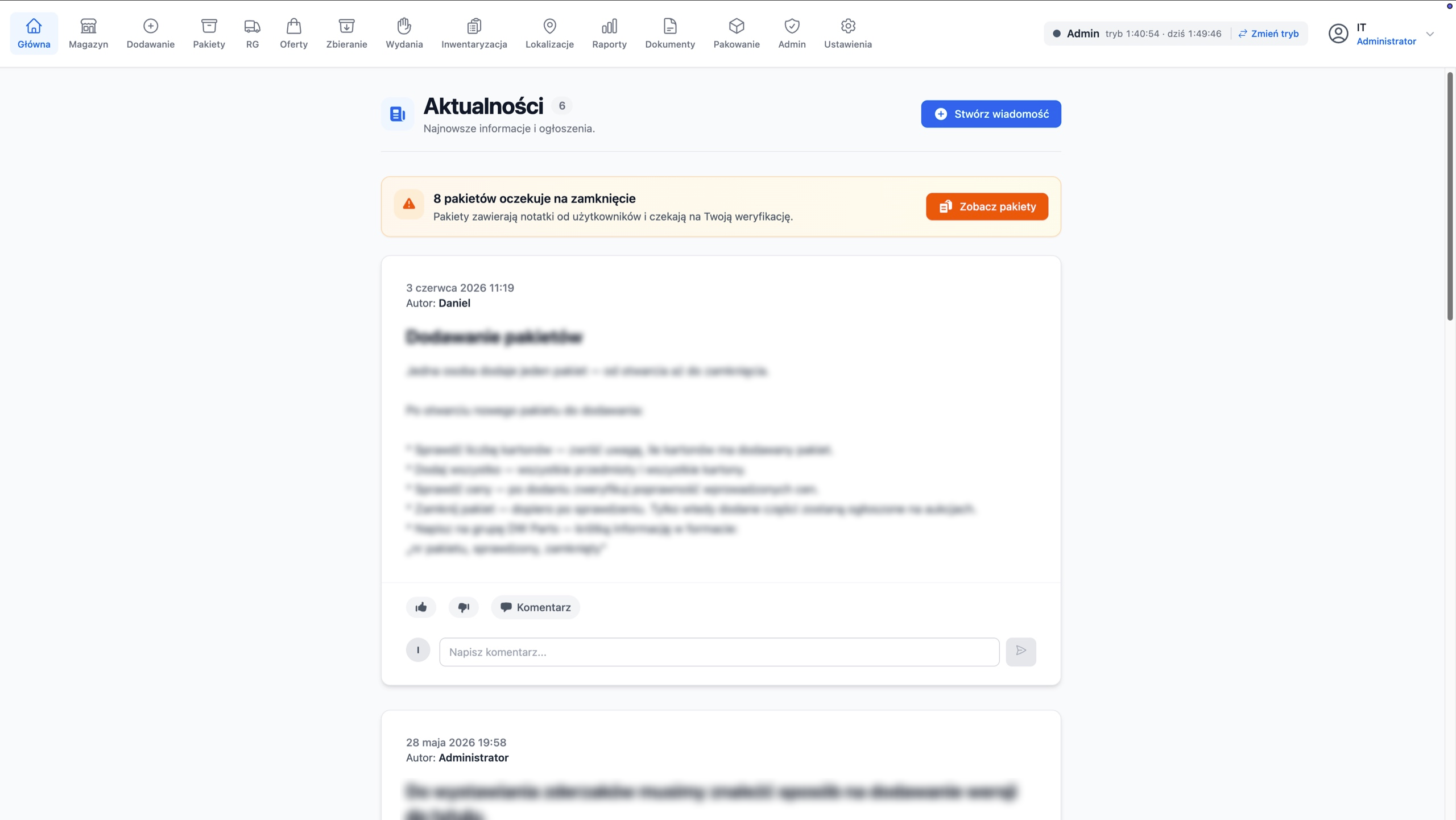
News feed
After logging in, a worker lands on the news feed. It's the place for posts from people who want to pass something on to the rest of the team, meaning notes, decisions and current information. Posts take comments and likes, and at the top you can see right away how many packages are still waiting to be closed.
Summary
A lot came together in this one project, from scraping, through LLM calls, pulling orders from the OMS platforms, warehouse documents and packing with courier selection, to migrating data out of the old system. The main outcomes are below.
- The legacy stack replaced by one system, with sales unblocked by an MVP in two weeks.
- 5x more parts added thanks to the AI agent, with no manual page-hunting.
- A 22,000-part table that scrolls smoothly thanks to
Clusterize. - Sales fully automated, with stock and orders synced to the OMS and packing that picks the box and the cheapest shipping on its own.
- Works offline thanks to the local server on Electron.
The biggest lesson from this project is that the real value wasn't standing up a system, it was plugging AI in exactly where it removed the dullest, most repetitive work, and doing it so that the team trusts it in production.
Got a process that eats your time? Write to me.
Get in touch